

Product battery recycling compliance
Learn how to stay compliant with battery recycling laws while supporting a cleaner planet. This guide walks you through everything you need to set up your point-of-sale system and train your team for fee collection on two different battery recycling programs:
- California SB 1215 — Covered Battery-Embedded (CBE) Waste Recycling Fee (variable fee, % of price, capped)
- Call2Recycle — E-Bike Batteries (fixed fee collected via SKU)
Updated California SB 1215 Article
Check out our updated article on the California SB 1215 Covered Battery-Embedded (CBE) Waste Recycling Fee by clicking here.
Call2Recycle - E-Bike Batteries
E-bike batteries have a useable lifespan and at the end of that life, they need to be safely recycled. Trek partners with PeopleForBikes and Call2Recycle to make e-bike battery recycling simple and safe for you and your riders.
⚠️ Important Call2Recycle rules
- When a customer buys an e-bike or e-bike battery, you must also add the Call2Recycle SKU.
- This $15 (US) or $10 (Canada + tax) fee covers recycling.
- The SKU should show as a separate line item on the receipt.
1) Create the SKU in Ascend
- Navigate to Database Explorer > Products (or click the Products tile on the Ascend Desktop).

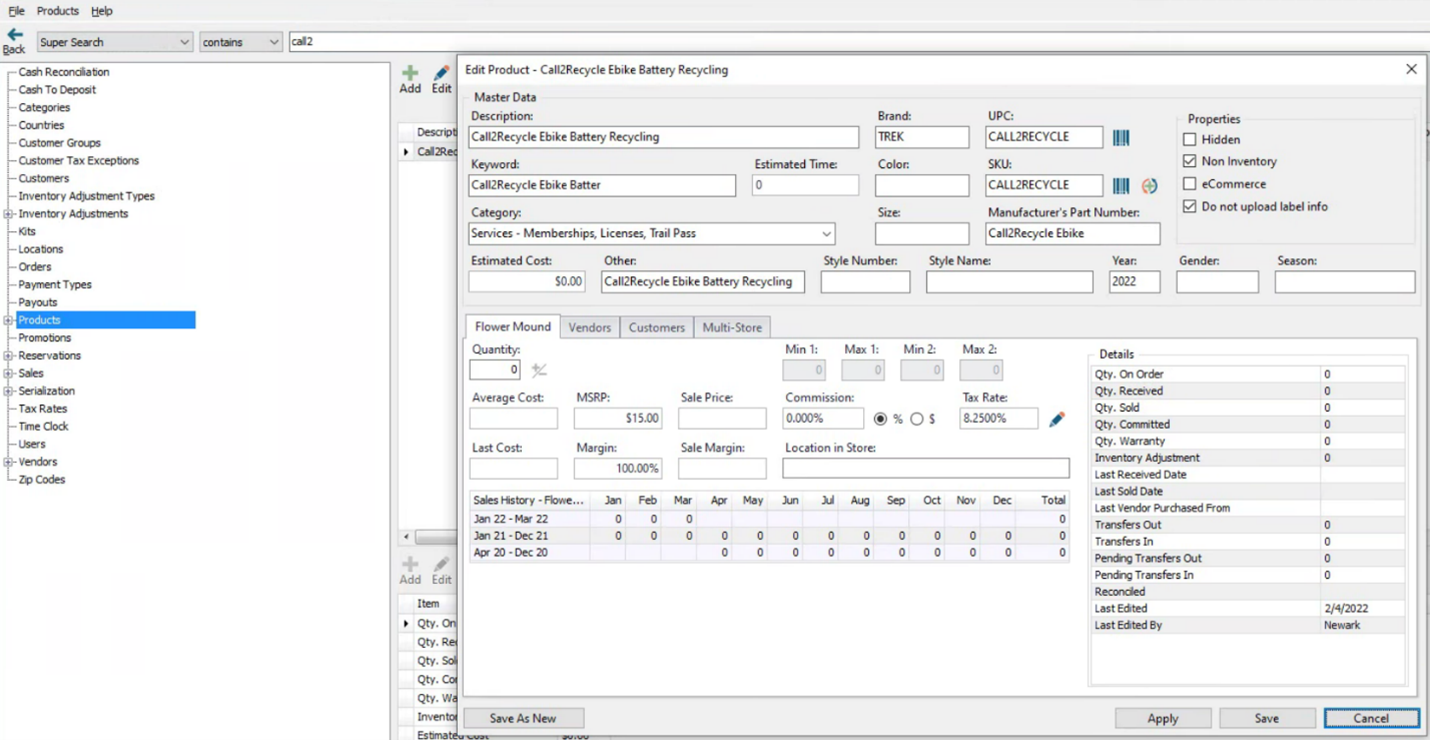
- Click Add and create a new non-inventory product:
- Description: Call2Recycle Ebike Battery Recycling
- BRAND: Trek
- UPC: CALL2RECYCLE
- SKU: CALL2RECYCLE
- Keyword: Call2Recycle Ebike battery recycling
- Manufacturer’s Part Number: Call2Recycle Ebike
- Estimated Cost: $0.00
- MSRP: $15.00 (USA) or $10.00 (Canada)
- Check the Non-Inventory box under Properties on the top right.
- Click Save
2) Using the SKU
When checking out a customer that has purchased an e-bike or an e-bike battery at the cash register, the product should be scanned and then the Call2Recycle SKU must be added. This SKU will appear as a separate line item on the customer’s receipt.
Accounting & integrations
These are recommended steps to track recycling fees properly in your accounting system. Confirm with your bookkeeper before making changes.
Please consult your accountant before making any changes.
The accounting and TermSync guidance below is a starting point based on the existing Call2Recycle workflow. Confirm with Bookkeeping before you implement changes—especially for California SB 1215, which is a state fee that is collected and remitted (typically treated as a liability rather than revenue).
Accounting Software
- Create an income account in your accounting software for eBike Battery Recycling Fees. Include it with other income accounts mapped from Ascend.
- Create a cost of goods sold account in your accounting software for eBike Battery Recycling Fees. Do not include it with other COGS accounts mapped from Ascend. Place it near other non-Ascend COGS accounts (examples: Freight-In or Inventory Adjustments).
- Create a parent category in Ascend for eBike Battery Recycling Fees
- Categorize the SKU created above here.
- Map sales to the income account created above.
- Map cost of goods sold to the COGS account created above.
TermSync
- Once the fee begins appearing on Trek invoices, it will need to be mapped/keyed from invoices.
- US Retailers integrating TermSync with QuickBooks:
- Dashboard & Messages > QuickBooks Setup
- Assign the account number created in the Accounting steps above.
- Non-integrated retailers:
- Key the eBike Recycling fee to the cost of goods sold account created in the Accounting steps above.
✅ Why it matters
- Keeps bike and parts margins accurate
- Matches Ascend data with your income statement
- Makes fees easier to reconcile—even if a cashier forgets to charge one
KB22-132