

Tax-related User Permissions:
- Tax - Edit Base Tax Rates: Allows users to activate a new Sales Tax Rate or edit an existing Sales Tax Rate in the Ascend database.
- Taxation - Edit Customer Tax Exceptions: Allows users to configure Customer Tax Exceptions. These reasons can then be selected when a customer is granted a tax exception.
- Tax - Sales Item Tax Override: Ability to override the default tax rate on items at the time of purchase.
- Payment Types (for coupon tax rates): Ability to manage payment types which can be applied to transactions.
- Products/Vendor Products - Add/Edit Master Data (for product/SKU tax rates): Ability to manage information in the Master Data section of the Product Editor, which is shared between all store locations (e.g. Description, UPC, SKU, Category, Brand) and adding products from within the Cloud Catalog.
- Advanced Payments, depending on if Trade-ins are marked as advanced payment types at your store.
For more information on permissions, check out our article, Users - User Permissions.
Tax Rate Hierarchy
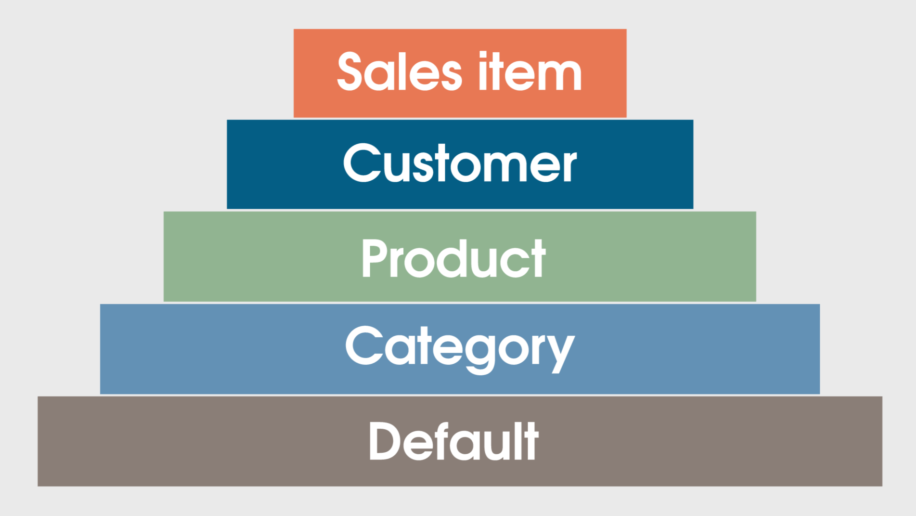
If you have multiple tax rate overrides in effect for a sale item, the rate that applies depends on where it's at in the tax rate hierarchy:
- If a sale item has a tax rate set, the Sales Item rate is used.
- If no tax rate is set on the sale item and the customer has a tax rate set, the Customer rate is used.
- If no tax rate is set on the sale item or customer and the product has a tax rate set, the Product rate is used.
- If no tax rate is set on the sale item, customer, or product and the category has a tax rate set, the Category rate is used.
- If no tax rates are overridden, the Default rate is used.
Set Default Tax Rate
For more information on setting or editing Default Tax rates, check out our article, Configuration - Set Up or Edit Tax Rates.
Set Category Tax Rate
For more information on setting or editing Category Tax rates, check out our article, Categories - How to Create or Edit Categories.
To set a Category Flat Tax (e.g.: Oregon Bike Tax), check out our article, Configuration - Set Up a Category Flat Tax.
Set Product Tax Rate
For more information on setting or editing Category Tax rates, check out our article, Configuration - Set Up a Product Tax.
Set Customer Tax Rate
For more information on setting or editing Customer Tax rates, check out our article, Customers - Create a Customer.
To create Customer Exception/Exemption reasons, check out our article, Configuration - Add a Tax Exception Reason.
Set Sales Item Tax Rate
For more information on setting or editing Sales Item Tax rates, check out our article, Configuration - Change a Tax Rate During a Sale.
Additional Resources
KB26-05